As previously mentioned an operating system is an integrated collection of system programs. Each program performs specific duties. Because all operating system programs work as a "team," CPU idle time is avoided and utilization of computer facilities is increased. Operating system programs are kept online on a storage device known as the system residence device. The storage media most commonly used are magnetic tape drives. (TOS- tape operating system) and magnetic disk drives (DOS- disk operating system).
Two types of programs make up the operating system: control programs and processing programs. Control programs oversee system operations and perform tasks such as input/output, scheduling, handling interrupts, and communicating with the computer operator or programmer. They make certain that computer resources are used efficiently. Processing programs are used by programmers to aid in the development of application and system programs.
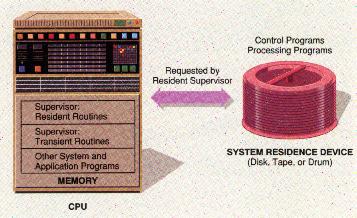
CONTROL PROGRAMS: The supervisor program (also called the monitor or executive), the major component of the operating system coordinates the activities of all other parts of the operating system. When the computer is first put into use the supervisor is the first program to be transferred into memory from the system residence device. Only the most frequently used components of the supervisor are initially loaded into memory. These components are referred to as resident routines, because they remain in memory as long as the computer is running. Certain other supervisor routines known as transient routines remain on the storage device with the remainder of the operating system. Resident routines call for these transient routines as needed and load them into memory. The supervisor schedules I/O operations and allocates communication channels to various I/O devices. It also sends messages to the computer operator indicating the status of particular jobs, error conditions, and so forth. The picture below illustrates how supervisor routines control access to the programs on the system residence device.
The operating system requires job-control information in order to instruct it as to how a particular job is to be carried out. (A job is a task to be processed by the CPU.) A job-control language (JCL) serves as the communication link between the programmer and the operating system. Job-control languages are typically used in conjunction with the batch oriented portion of operating systems.
PROCESSING PROGRAM: The operating system contains several processing programs that facilitate efficient processing operations by simplifying program preparation and execution for users. The major processing programs contained in the operating system are the language translators; linkage editor, library programs, and utility programs.
Operating systems also include a set of utility programs that perform specialized functions. One such program transfers data from file to file, or from one I/O device to another. For example, a utility program can be used to transfer data from tape to tape, tape to disk, disk to tape, or tape/disk to printer. Other utility programs known as sort/merge programs are used to sort records into a particular sequence to facilitate the updating of files. Once sorted, several files can be merged to form a single, updated file. Job-control statements are used to specify the sort/merge program to be accessed; these programs or routines are then called into memory when needed.
ADDITIONAL SOFTWARE: As mentioned at the beginning of the unit, system programs are available from a variety of sources. Each data-processing department must decide which system programs should be included in its operating system.
Once the essential operating system has been purchased, optional programs may be obtained. These programs can either improve an existing operating system or provide additional capabilities to the existing operating system. For example, the operating system for a bank's computer might be supplemented with a program to interface with MICR (magnetic ink character recognition) equipment. Applications requiring the use of light pens with display terminals also demand special system programs.
Last Updated Aug 25/99